

Introduction
SFMCompile is a term commonly used in the Source Filmmaker community to describe the process of preparing and compiling custom 3D assets so they can be used correctly inside Source Filmmaker (SFM). It is particularly important for creators who want to bring custom characters, props, animations, textures, or other assets into their SFM projects.
Source Filmmaker uses Valve’s Source engine and expects assets to be supplied in specific formats. A model created in Blender, Maya, or another 3D application cannot simply be dropped into SFM in its original working format and expected to function automatically. Instead, creators generally need to export the appropriate source files, define how those files should be assembled, and run them through Valve’s compilation tools or community utilities.
This process can initially seem complicated because it involves several file types, directories, tools, and configuration files. Once the workflow is understood, however, SFMCompile becomes much easier to manage.
This guide explains what SFMCompile means, how the compilation pipeline works, which tools are commonly used, how models and textures are prepared, common errors, and best practices for beginners and experienced SFM creators.
What Is SFMCompile?
SFMCompile is best understood as the asset-conversion and preparation process used to make custom content compatible with Source Filmmaker.
When a creator builds a model in Blender or another 3D application, the original project may contain geometry, materials, bones, animations, UV coordinates, and other information. SFM does not simply read that source project file.
Instead, the creator exports the necessary data into Source-compatible formats and uses compilation tools to create the files that SFM can load.
For models, this commonly involves formats such as:
- SMD
- DMX
- QC
- MDL
- VVD
- VTX
- PHY
Textures use a related but separate material pipeline involving formats such as:
- TGA or PNG as source images
- VTF for Source textures
- VMT for material definitions
The exact files generated depend on the type of asset being compiled and the options used in the QC script.
Why Does SFM Need Compilation?
Source Filmmaker is based on Valve’s Source technology, so it expects assets to follow the conventions of the engine.
Modern 3D applications can work with formats such as:
- FBX
- OBJ
- BLEND
- GLTF
- USD
But these are not automatically interchangeable with the asset formats expected by classic Source-based tools.
Compilation acts as a bridge between the creator’s production environment and the Source engine.
A simplified workflow looks like this:
3D software → exported source files → QC instructions → compiler → Source-compatible assets → Source Filmmaker
This conversion makes it possible for SFM to understand the model’s geometry, materials, skeleton, animations, physics information, and other required data.
SFMCompile Is Not the Same as Rendering a Video
One important distinction is that compiling a model is not the same thing as rendering an SFM animation.
The word “compile” can cause confusion because it may be used in different contexts.
For custom models, compilation means turning source asset data into engine-compatible files.
For maps, compilation involves a different collection of Source tools.
Rendering an animation, meanwhile, means producing the final visual output from an SFM scene.
These are separate stages of a production workflow.
For example:
- Create a character in Blender.
- Export the character.
- Compile the character for Source.
- Load it into SFM.
- Animate the character.
- Light and compose the scene.
- Render the finished animation.
SFMCompile primarily concerns the earlier asset-preparation stages.
The Core SFMCompile Workflow
A typical custom-model workflow contains several major stages.
Step 1: Create or Prepare the Model
The process starts in a 3D application such as Blender, Maya, or 3ds Max.
The model should be properly prepared before export.
Important considerations include:
- Correct scale
- Clean geometry
- Appropriate UVs
- Proper material assignments
- Correct bone hierarchy
- Appropriate weight painting
- Correct object orientation
- Proper naming conventions
A model that is not correctly prepared can create problems later during compilation.
Step 2: Export the Model
Once the model is ready, it must be exported into a format supported by the Source compilation workflow.
SMD is one of the traditional formats used by Source pipelines. DMX can carry additional information and is also used by Source tools. Current SFMCompile documentation describes SMD and DMX as common source formats used before compilation.
A creator may export different files for different purposes.
For example:
- Reference mesh
- Collision mesh
- Animation sequences
- Additional bodygroups
A character may require considerably more source data than a simple static prop.
Step 3: Create the QC File
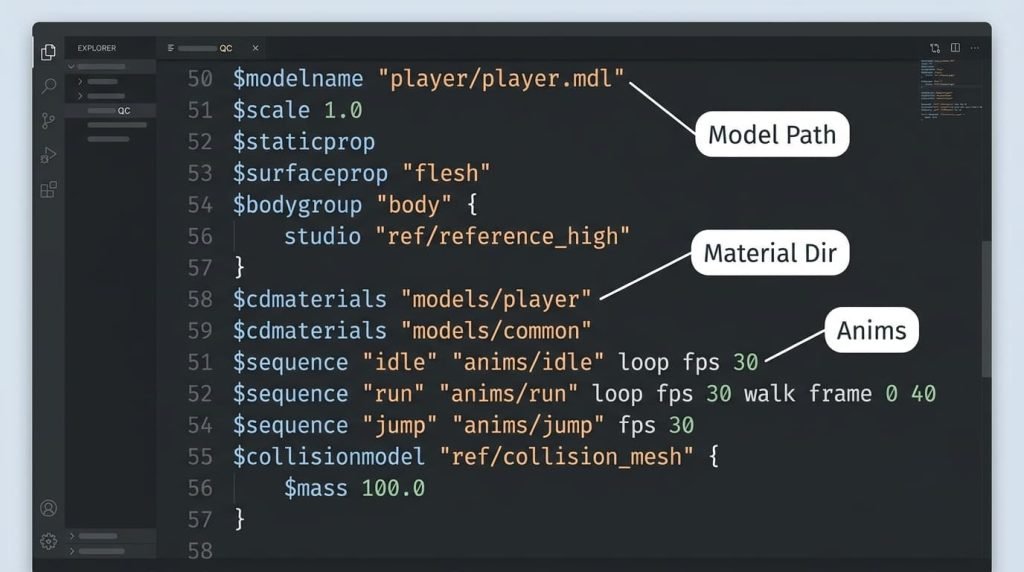
The QC file is one of the most important parts of the compilation process.
It is essentially an instruction file for the Source model compiler.
The QC file tells the compiler things such as:
- Where the model should be created
- Which SMD or DMX file contains the model
- Where materials are located
- Which animations should be included
- What collision model should be used
- What surface properties apply
- How the model should be structured
A simplified QC example might look like this:
$modelname "custom/my_model.mdl"

$body "body" "my_model.smd"

$cdmaterials "models/custom/"

$sequence "idle" "idle.smd"

$surfaceprop "default"
The exact commands required depend on the model and the desired functionality.
The QC file should therefore be treated as the blueprint for the compilation process.
Step 4: Compile the Model
Once the QC file and source assets are ready, the model can be compiled.
The traditional Valve compiler is studiomdl.exe. Community tools such as Crowbar provide a graphical interface that makes Source model compilation considerably easier for many users. Current SFMCompile documentation recommends Crowbar as a practical way to manage the compiler and inspect compile logs.
The compiler processes the QC instructions and source files and generates the model files required by SFM.
A successful model compilation commonly produces files such as:
.mdl.vvd.vtx.phywhen physics information is included
The files work together and generally need to remain in their expected directory structure.
Understanding the Main Compiled Model Files
Understanding these files makes troubleshooting much easier.
MDL
The MDL file is the primary compiled model file.
It contains important information about the model and acts as one of the main files SFM uses when loading the asset.
VVD
The VVD file contains vertex-related information for the model.
It works alongside the MDL and VTX data.
VTX
VTX files contain optimized rendering information used by Source.
Different versions may be generated depending on the compiler and configuration.
PHY
A PHY file contains physics collision information when a collision model has been defined.
Not every visual asset requires physics.
Understanding Textures: VTF and VMT
Model compilation and texture preparation are related but separate processes.
A common beginner mistake is to compile the model correctly while forgetting that Source also needs properly configured materials.
VTF
VTF, or Valve Texture Format, is the texture format used by Source.
A source image such as a PNG or TGA may need to be converted into VTF.
VMT
VMT, or Valve Material Type, is a text-based material definition.
It tells Source which shader and texture information should be used.
A simple material might look conceptually like this:
"VertexLitGeneric"
{
    "$basetexture" "models/custom/my_model"
}
The exact material configuration depends on the desired visual effect.
Incorrect VMT paths are one of the most common reasons a model appears with missing or incorrect textures.
Common Tools Used With SFMCompile
A functional Source Filmmaker asset pipeline commonly involves several tools.
Source Filmmaker
SFM is the application in which the finished assets are ultimately used.
It provides the environment for:
- Animation
- Camera work
- Lighting
- Scene composition
- Audio
- Rendering
Blender
Blender is a popular free 3D application for creating and editing custom models.
It can be used for:
- Modeling
- UV mapping
- Rigging
- Weight painting
- Animation
- Texture preparation
Blender Source Tools
The Blender Source Tools add-on provides Source-compatible export capabilities and is commonly used when preparing Blender assets for Source-based applications.
Crowbar
Crowbar is a popular community utility for Source-engine model workflows.
It can provide a graphical interface for tasks such as:
- Compiling models
- Decompiling models
- Managing QC files
- Viewing compiler output
It is particularly useful for beginners because it makes compiler errors easier to inspect than a bare command-line workflow.
VTFEdit
VTFEdit is commonly used for converting images into VTF textures and working with Source material files.
Text Editor
A normal text editor can be used to create and edit QC and VMT files.
Notepad++ is commonly used because syntax highlighting and search functions make large files easier to manage.
Compiling a Basic Prop
A simple prop is an excellent first project because it involves fewer moving parts than a fully animated character.
A basic workflow is:
1. Create the prop
Model a simple object in Blender.
2. UV unwrap it
Make sure the object’s surfaces have appropriate UV coordinates.
3. Assign materials
Create and assign the necessary materials.
4. Export the reference model
Export the object as SMD or DMX using an appropriate Source export tool.
5. Prepare the texture
Convert the source texture into VTF format.
6. Create the VMT
Create a material definition pointing to the appropriate VTF.
7. Write the QC file
Tell the compiler where the model and material files are located.
8. Compile with Crowbar or studiomdl
Run the compiler and inspect the output log.
9. Place the compiled files correctly
Put the resulting assets into the appropriate SFM game directory.
10. Test in SFM
Open Source Filmmaker and locate the compiled model through the asset browser.
Starting with a simple prop makes it easier to identify whether the problem is related to the model, materials, paths, or QC configuration.
Compiling Characters
Characters are more complicated than props because they usually contain skeletons, weighted meshes, animations, and sometimes facial flexes.
A character pipeline may involve:
- Base mesh
- Skeleton
- Weight painting
- Reference SMD or DMX
- Animation files
- Facial data
- Bodygroups
- Materials
- Collision data
- QC commands
The model must be structurally compatible with the Source skeleton and animation system.
A character can compile successfully while still behaving incorrectly in SFM. For example, the model might load but have:
- Broken deformation
- Incorrect bone positions
- T-pose problems
- Missing animations
- Incorrect facial movement
- Strange scaling
This is why compilation should be considered both a technical and artistic pipeline.
Animation Compilation
Animation data generally requires separate preparation.
A character may have individual animation files for:
- Idle
- Walk
- Run
- Attack
- Jump
- Facial movements
- Cinematic actions
The QC file can define which sequences are included and how they should behave.
For example, a simplified sequence definition might resemble:
$sequence "idle" "idle.smd" fps 30Real projects can require substantially more complicated commands.
Animation problems often originate from mismatched skeletons, incorrect export settings, or incompatible animation data rather than from the compiler itself.
Map Compilation Is Different
It is important not to confuse model compilation with map compilation.
Source map development uses tools such as:
- Hammer
- VBSP
- VVIS
- VRAD
These tools perform different functions.
VBSP
VBSP processes map geometry and produces a BSP map.
VVIS
VVIS performs visibility calculations.
VRAD
VRAD calculates lighting information.
Therefore, someone creating a custom SFM map will encounter a different compilation pipeline than someone compiling a character or prop.
Common SFMCompile Errors
Compilation problems are extremely common when someone is learning the Source asset pipeline.
Missing File Errors
A compiler may report that an SMD, DMX, QC, or other file cannot be found.
Usually, this means:
- The file is in the wrong folder.
- The filename is incorrect.
- The path in the QC file is wrong.
- The file extension is incorrect.
Missing Texture
A model may load but display a purple-and-black checkerboard pattern or otherwise incorrect material.
Common causes include:
- Incorrect VMT path
- Incorrect VTF path
- Missing VTF
- Incorrect capitalization
- Incorrect material folder
- Incorrect
$basetexturedefinition
Model Does Not Appear
If the model does not appear in SFM, check:
- Whether compilation actually succeeded.
- Whether the MDL was generated.
- Whether the VVD and VTX files are present.
- Whether the files were placed in the correct game directory.
- Whether the model name and search path are correct.
T-Pose
A T-pose often points toward an animation or rigging problem.
Possible causes include:
- Missing animation
- Incorrect skeleton
- Incorrect bone hierarchy
- Bad weighting
- Incorrect QC sequence definitions
Incorrect Scale
If a model appears enormous or tiny, the problem may originate in the export settings or the model’s original scene scale.
Establishing a consistent scale before exporting is much easier than attempting to fix scale problems later.
Compiler Window Closes Immediately
Beginners sometimes run studiomdl.exe directly and find that the command window closes after an error.
Using a tool such as Crowbar can make compiler output much easier to inspect and troubleshoot.
How to Make SFMCompile More Efficient
Once the basic process works, creators can improve their workflow considerably.
Keep Projects Organized
Use a predictable folder structure.
For example:
SFM_Project/
    models/
    materials/
    animations/
    qc/
    source/
    exports/
Organization becomes increasingly important as projects grow.
Use Short, Clear Paths
Avoid unnecessarily complicated folder names and paths.
Simple directory structures make debugging easier.
Maintain Consistent Naming
Instead of using random filenames such as:
model_final_FINAL2.smduse consistent names such as:
character_reference.smd
character_idle.smd
character_walk.smd
character_collision.smd
Keep Source Files
Never rely exclusively on the compiled output.
Keep the original:
- Blender file
- SMD/DMX exports
- QC files
- VMT files
- Source textures
If you need to make a change later, these files allow you to recompile the asset.
Test Small Changes
When troubleshooting, avoid changing ten things simultaneously.
Change one element, compile again, and inspect the result.
This makes it much easier to identify the actual cause of a problem.
SFMCompile and Modern 3D Workflows
One reason SFMCompile can feel complicated is that modern 3D applications have become increasingly convenient.
Many modern engines provide direct import systems.
A creator may drag an FBX file into a modern engine and immediately see the asset.
Source Filmmaker’s older technology does not work that way.
The classic Source pipeline relies on dedicated formats and compilation tools.
That may feel outdated, but it also gives experienced creators considerable control over how assets are structured.
SFMCompile vs. Source 2
Source Filmmaker belongs to Valve’s older Source ecosystem.
Source 2 uses a different asset pipeline and tooling environment.
This distinction matters because tutorials for Source 2 tools should not automatically be applied to classic SFM.
Creators working with traditional Source Filmmaker should make sure that tutorials and tools specifically target the classic Source/SFM pipeline.
Is SFMCompile Difficult for Beginners?
It can be confusing initially, but it is absolutely learnable.
The biggest challenge is not usually the compiler itself.
Instead, beginners have to understand the relationship between:
3D software → export format → QC file → compiler → materials → SFM
Once those relationships become familiar, troubleshooting becomes much more logical.
A good learning strategy is to avoid starting with a complex character.
Instead:
- Compile a simple cube.
- Add a texture.
- Compile a simple prop.
- Add a collision model.
- Compile an animated object.
- Move on to a character.
Each project introduces one new concept without overwhelming the learner.
Important Legal and Community Considerations
Technical ability is only one part of working with custom SFM assets.
Creators should also pay attention to licensing and intellectual-property rights.
If a model, texture, character, animation, or other asset belongs to another creator, check its license before:
- Modifying it
- Redistributing it
- Publishing it
- Selling it
- Including it in commercial work
Decompiling an asset can be useful for technical learning, but it does not automatically give someone permission to redistribute another creator’s work.
Proper attribution and respect for the original creator are important parts of the SFM community.
Advantages of Understanding SFMCompile
Learning the compilation pipeline offers several benefits.
More Creative Freedom
You are no longer limited to the default collection of assets.
Custom Characters
You can prepare original characters for use in SFM.
Custom Props
Objects designed specifically for a project can be incorporated into scenes.
Custom Animations
You can prepare animations that fit your own cinematic projects.
Better Troubleshooting
Understanding the pipeline makes it easier to diagnose missing textures, broken models, and animation problems.
Reusable Skills
Knowledge of Source asset compilation can also help with other Source-engine workflows.
Limitations of the SFMCompile Workflow
The process also has disadvantages.
It Is More Technical Than Modern Import Pipelines
Beginners have to understand several file formats and tools.
Errors Can Be Difficult to Interpret
Source compiler messages can be confusing without experience.
Asset Preparation Takes Time
A high-quality model requires careful preparation before it is ready for SFM.
Old Technology Creates Compatibility Challenges
Classic SFM’s older engine technology means modern workflows do not always translate directly.
Frequently Asked Questions
What does SFMCompile mean?
SFMCompile generally refers to compiling and preparing custom assets for use in Source Filmmaker.
Is SFMCompile a separate program?
The term can describe the compilation process itself rather than one universally defined standalone application. The workflow commonly uses Valve’s Source compiler tools and utilities such as Crowbar.
What is a QC file?
A QC file is a text-based instruction file that tells the Source model compiler how to assemble and compile a model.
What files does a compiled model need?
A typical compiled model uses an MDL together with supporting files such as VVD and VTX. A PHY file may also be generated when physics information is included.
Why are my textures missing?
The most common causes are incorrect VMT or VTF paths, missing texture files, or incorrectly organized material directories.
Can Blender models be used in SFM?
Yes. Blender can be used to create models and export them into formats suitable for the Source compilation workflow, typically with a Source-compatible exporter.
Is Crowbar useful for beginners?
Yes. Crowbar provides a more accessible interface around Source compilation and can make compiler output easier to inspect.
Can I compile animations?
Yes. Animation sequences can be exported and defined through the QC workflow, although character animation requires considerably more preparation than a static prop.
Final Verdict
SFMCompile is an essential concept for anyone who wants to bring custom assets into Source Filmmaker. It represents the technical bridge between 3D creation software and the asset formats that classic Source-based tools can understand.
The basic workflow involves creating or preparing an asset, exporting it into an appropriate Source-compatible format, writing a QC file, compiling the asset, preparing its materials, placing the resulting files correctly, and testing everything inside SFM.
Although the process can initially appear complicated, it becomes much easier once creators understand the role of each component. The QC file provides the instructions, the compiler creates the engine-ready model files, VTF and VMT handle textures and materials, and SFM ultimately brings the finished asset into the cinematic environment.
For beginners, the best approach is to start small. A simple prop can teach the fundamentals of exporting, material paths, QC files, compilation, and installation without introducing the complexity of character rigs and animation.
For experienced creators, mastering SFMCompile provides much greater control over custom characters, props, environments, and animations.
In an era when many modern creative applications emphasize one-click importing, the classic Source workflow may seem old-fashioned. Nevertheless, understanding how it works remains valuable for anyone who wants to create sophisticated custom content for Source Filmmaker.